Fortigate firewall – Generate CSR
Generate CSR in FortiGate
Description
This article describes how to generate CSR and Private key on FortiGate in GUI.
Steps:
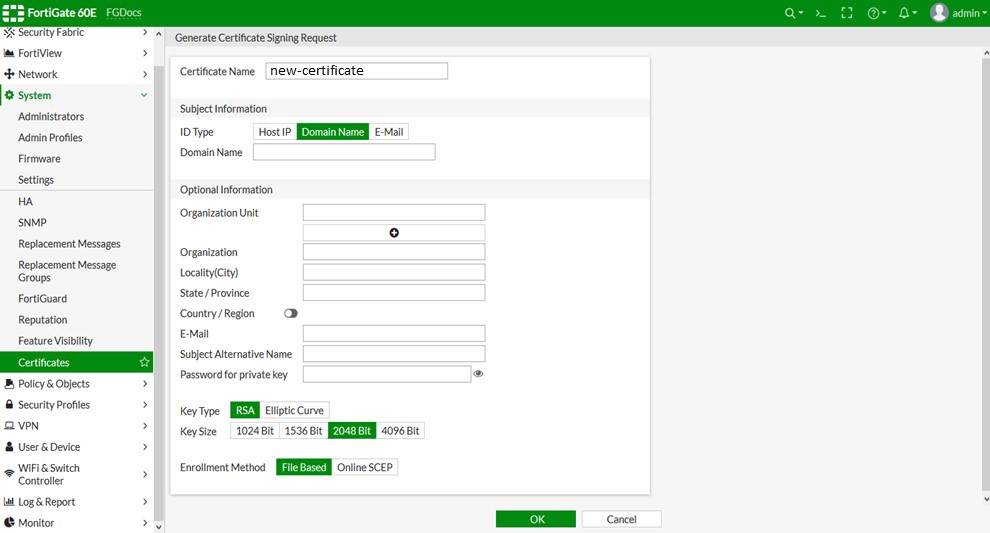
- Go to System -> Certificates and select ‘+ Generate’ which will open a ‘Generate Certificate Signing Request’.
- Certificate Name: Give a friendly name to your CSR/Private key files.
- ID type: Select Domain Name option from the provided list.
-
Domain Name: Enter the fully qualified domain name for which the SSL will be requested (www.yourdomain.com or yourdomain.com). The common name for Wildcard certificates should be represented with an asterisk in front of the domain (*.yourdomain.com).
Note: You must fill in the Optional Information fields to obtain a certificate from your CA.
- Organizational unit: Enter the department of your company such as IT, HR etc.
- Organization: Enter the full legal name of your company.
- Locality (City): Enter the city/locality where your company is officially registered. Do not abbreviate.
- State/Province: Enter the state/province where your company is registered.
- Country: Enable the toggle and select your country from the drop-down list.
- Email: Leave this field blank.
- SAN: Leave this field blank.
- Password: Leave this field blank.
- Key Type: Select RSA from the drop-down list.
- Key Size: Select 2048 bits from the drop-down list.
- Enrollment method: Select the File Based option.
- Choose ‘OK‘ to generate the CSR.
-
The newly created CSR will be displayed in the “Local Certificates” tab. You can Choose the CSR name to view its details.

- Select newly created CSR and Choose ‘Download’.
- This will download .csr file in the browser and save the CSR file in any directory of your choice. You can now open it with any text editor (e.g., Notepad) and copy-paste its contents, including the BEGIN and END tags and paste it into the configuration page of your purchased order.
-----BEGIN CERTIFICATE REQUEST-----

MIIC5jCCAc4CAQAweDELMAkGA1UEBhMCVVMxDjAMBgNVBAgTBVN0YXRlMQ0wCwYD

VQQHEwRDaXR5MQwwCgYDVQQKEwNPUkcxCzAJBgNVBAsTAk9VMRAwDgYDVQQDEwcx

…

5yN/0aRPjUbSxKczkQxQfw7gvQPjieI1IRIk9TduYj/ic0DO1ch5Yau7+hEusR5a

7cSFo9S94oT6ZHFq22noaBF86l5VKArARqc=

-----END CERTIFICATE REQUEST-----