Apache – openssl
Generate CSR in Apache (Openssl)
If you prefer to build your own shell commands to generate your Apache CSR, follow the instructions below.
- Log in to your server via your terminal client (ssh).
- Run Command
At the prompt, type the following command:
Note: Make sure to replace server with the name of your domain.
openssl req -new -newkey rsa:2048 -nodes -keyout server.key -out server.csr - Generate Files
-
You have now started the process for generating the following two files:
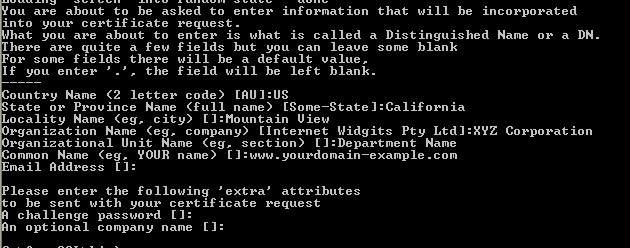
Country Name: Enter the two-letter code of the Country where your organization is registered. Example: US.
State/Province: Enter the full name of State/province where your company is registered.
Locality/City: Enter the full name of the city/locality where your company is registered.
Company/Organization: Enter the full legal name of your company.
Organizational Unit: Enter the department of your company such as IT, HR etc. To skip the OU field, press Enter on your keyboard.
Common Name: Enter the fully qualified domain name for which the SSL will be activated (www.yourdomain.com or yourdomain.com).Note: If you are generating a CSR for a Wildcard certificate, you should enter the common name starting with an asterisk and period (e.g., *.yourdomain.com).
- When asked for email address, leave it blank.
- When asked for a passphrase (challenge password), leave it blank.
- When asked for an Optional Company Name, leave it blank.
-
- Two files are generated: .CSR and .key (CSR and Private key).
- Open the .csr file with a text editor.
- Copy the text, including the —–BEGIN NEW CERTIFICATE REQUEST—– and —–END NEW CERTIFICATE REQUEST—– tags, and paste it into the SSL configuration page of your purchased SSL certificate.
- Save Private Key
Save (back up) the generated .key file on your end at safe location. You need it later while installing the certificate in your server.